After the RIF notice, before you leave

Family Update

In light of Sun’s current circumstances, here is an update of what I think is my most popular blog entry: “After the RIF notice, before you leave” (15 January 2009).

My husband, John Plocher, was laid off from Sun in November 2008 and (despite many interviews) is still looking for work. If anyone is looking to hire a senior software architect with extensive open source experience, please contact John!

This has been a wild year for our family. A few weeks after I wrote my “After the RIF notice..” blog entry, our son Paul ended up in emergency brain surgery. Paul recovered from that but still has constant terrible headaches. After finishing his Junior year at the hospital school, Paul is happy to be back in his regular High School for his Senior year. He plans to go to college next year. Having John off work during this time of medical adventures has been sortof a blessing.

Background

During the last year, we have found a good many things we wished we had thought to do before John was laid off. Additional items on this list were generously suggested to me from people who read my original 15 January blog entry. I eventually realized that official company sources are limited in what they can tell people. So, this unofficial list, while just based on limited observations and experience, turns out to have been of unique value to a variety of people. RIF stands for “Reduction in Force”, also known as a lay off or restructuring.

Here are my opinions of some good actions to consider after the termination notice but before you leave Sun and lose your SunWeb access (and some actions to consider after). Some of these actions may only be appropriate for Sun staff in California since circumstances may differ from state-to-state, and country-to-country. Some actions – like joining LinkedIn – are good ideas whether you are staying or leaving. Usual disclaimers apply. Your mileage may vary. May contain nuts.

First, if you have to leave Sun involuntarily, please accept my appreciation for your work. After  25 years of working here, I know that Sun is a great company. Even if I never knew or worked with you, I thank you for your contribution and I am sorry you have been laid off. Check out “A Tribute to Sun Microsystems” and remember your good times.

What to do immediately

  1. Before your SunWeb access shuts down, print out copies of key records:
    – Current and last year paycheck history
    – Company training history
    – Stock option history and status
    – Health benefit elections
    – Vacation balance
    – Past annual performance review documents
    Many of these records will just go away and be unavailable by any means soon after your last day in the office. You may need your training history for a future certification, and you will certainly need your vacation balance to apply for unemployment. This is your one and only chance to get copies.
  2. Immediately locate all personal internet identities (personal accounts, groups, billing, etc.) that you have communicating with your @sun.com email address, and change them to your personal email address. It is easy to set up a gmail account where you can continue to manage your billpay, website subscriptions and email lists after your Sun account goes away. Moving accounts will take time and those organizations may continue to send updates and confirmations to you @sun.com
    for days or even weeks. Start this move soon!
  3. Your Sun home directory will go away very shortly after your last office day. If you have personal email in your Sun home directory, move it or copy it to a home server or your personal laptop before your Sun home directory disappears. Gmail has a way to upload old messages from other email accounts. Don’t copy anything that belongs to Sun.
  4. If you have not already done so, use your Employee Giving matching grant for the current year. If you do not have a SunWeb account (and you will not), you cannot take advantage of this benefit even if you are laid off long before the end of the calendar year.
  5. Create a blogs.sun.com account or use your existing account to post a brief and professional going away message including at least your LinkedIn reference. Your blogs.sun.com postings stay available after you are gone.
  6. Change your Sun voice mail outgoing message with a new professionally phrased reference to your home phone or other non-Sun phone number.

What to do later

Resources which may help and actions to consider later:

  1. Sun provides some very good benefits to RIFed staff. Use any coaching services offered as part of your package (such as the excellent Right Management service). Let the service review your resume before you send it out. Join their networking groups.
  2. Think through your health, dental, vision, and life insurance choices and application timelines. Read your RIF package carefully. If the staff member who is laid off is the spouse of a continuing Sun staff member, talk with Human Resources (SunDial) soon about when and how you can initiate a “Qualifying Life Event Change” to provide insurance coverage to the RIFed spouse.
  3. File for Unemployment Insurance (UI) immediately. In most states there is at least a one week waiting period and some states may have more. In California, you can apply for Unemployment Insurance from the day of your notification (while you may still have months yet to receive Sun paychecks).
    If you are asked by the California Employment Development Department, do not call money Sun provides you after the 60-day WARN notification period “severance”. It is accurate to call it “payment to forestall legal action”.  More about the 60 days of WARN pay: The Worker Adjustment and Retraining Notification Act. I am told that while WARN is a type of “in lieu of” pay, WARN should NOT disqualify you from receiving UI benefits. For even more about this, read EDD’s Total and Partial Unemployment TPU 460.37.
    Here is Sun’s address and phone number which you will need for the EDD paperwork – from Sun’s 2008 Annual Report:

    Sun Microsystems, Inc.
    4150 Network Circle Santa Clara, CA 95054
    (650) 960-1300

  4. In the San Francisco Bay Area, there is a networking and lunch group called CSix where job hunters share ideas and leads. Similar formal or informal groups probably exist elsewhere.
  5. Review and update your resume. Create one or more cover letter templates. Review and confirm your references. (You need to know that Sun and other companies have a policy against giving job references.) Brush up on your interview skills.
  6. Buy a current-year copy of the book What Color Is Your Parachute? by Richard Nelson Bolles. This book is available in many languages (French, Korean, Russian, Turkish…). Also check out the resources on Dick Bolles’ web site: JobHuntersBible.Com
  7. Join LinkedIn – a social networking web site for professionals who want to extend their contacts. Follow LinkedIn’s advice to create your complete profile. Be diligent in linking to your former Sun coworkers so that you don’t lose each other once you are no longer @sun.com. Use LinkedIn to recommend people you think highly of and also ask them to recommend you. There are several LinkedIn Sun Alumni groups, including SUNAlumni. Sun Engineering SEED mentoring program alumni can join the SEED LinkedIn group.
  8. Join the Sun Microsystems Alumni Association “The network is the people”
  9. Consider other social networking sites such as Facebook which has several Sun Alumni groups, including: The Sun Microsystems Alumni Group, Sun Alumni on Facebook, and others. Facebook also has a “SEED Engineering Mentoring Program” Fan Page. Plaxo is another good networking, address book site.
  10. Participate in Sun Alumni Blogs
  11. Make your own business cards so that you can easily tell contacts your new email and phone. John and I like the designs at Overnight Prints.
  12. Make doctor, dentist, and other health care appointments soon, so you are seen while you are still insured. Renew prescriptions that are close to refills. The U.S.  COBRA continuation health insurance coverage isn’t always the same as the coverage you had before.
  13. Consider creating a special job seeking email address at yahoo.com or gmail.com. Make it professional, not cute.
  14. A job searching and recruitment web site which some people have recommended is http://www.dice.com/
    – “career website for technology and engineering professionals”
  15. A job searching web site which some people have recommended is http://www.indeed.com/ “to search job sites, newspapers, associations and company career pages”

Keep active and keep networking. Volunteer while looking for work. If you are in the San Francisco Bay Area and need a good cause, you are welcome to join John and me in helping inner city San Jose kids in the computer club at SMUM.

Don’t lose touch with Sun people you care about. As John says, there are only really 100 people in the Silicon Valley, everyone else is just there to create traffic jams.

2 Comments

Filed under Home & Family, News & Reviews

How to Run a Church Convention

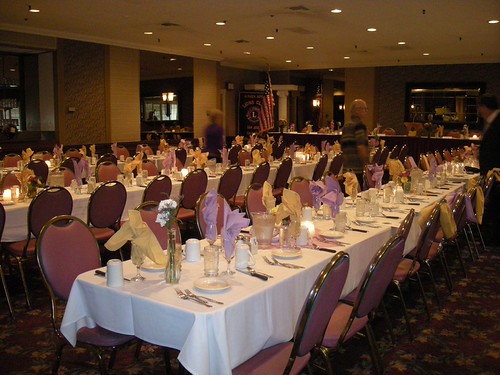
The Episcopal Diocese of El Camino Real held its Diocesan Convention 2009 last weekend. I was a Delegate from  St. Andrew’s Episcopal Church (Saratoga, California) and my husband, John Plocher, was an Alternate Delegate and also backed up Web Sacristan Stephenie Cooper in managing the information flow to the big screen. Our son Paul was a convention Youth Representative for the first time. This blog entry is to document how Stephenie and John set things up so that there is a record for our own future use (and because it might be of use to others). This blog does not provide much information about the sound system, which had a separate crew managing it.

Ours is not a big diocese, there are 47 parishes (church areas) between Nipomo and Palo Alto on California’s central coast, with 189 possible lay Delegates and 134 possible clergy Delegates. Our leader is Bishop Mary Gray-Reeves. There were 200 to 250 people in Sherwood Hall (Salinas) during the two days of convention. Sherwood Hall has a raised proscenium-style stage which is forty feet deep and sixty feet wide.  Here are some diagrams John drew of the stage layout and hardware, plus photos of what it looked like in the hall and behind the big screen:

StageLayout

AVLayout

DSCN6222 DSCN6324 DSCN6153

Overview

Stephenie has been running the computers for convention for many years; this is John’s first time. The computer resources required to run convention have been doubling or tripling each year. The big screen presents everything at convention, including the agenda, instructions, song lyrics, the text of resolutions and ballot lists, plus videos and slide shows. The convention has a somewhat flexible schedule since resolutions may be amended, discussions may go longer or shorter than planned, and people may arrive with a video or slide show to add that is unexpected or does not match what they said they would bring. The convention follows Robert’s Rules of Order for meeting procedure.

Stephenie lives near us, so she and John mocked up the convention audio/visual layout at our house in the weeks before the event. They used almost every laptop we had plus monitors borrowed from the computer lab at SMUM (Santa Maria Urban Ministry). John bought about $125 in bits and pieces to put everything together.

Stephenie and John relied on PC and Mac laptops using simple and standard tools. That is, the displays used the same hardware and software tools with which the information was originally put together. There was no special software package. Reusing standard pieces allowed quick responses plus maximum flexibility, additions, and changes during the event. There was much dynamic interaction and modification of both music and meeting content.  In general, Stephenie ran the screen while John queued material and coordinated with people who came backstage to add or change or discuss what was coming next.

The convention had very few computer problems this year. Every once in a while, during a transition we in the hall would hear a voice coming from behind the screen saying “almost ready…” Of course, several people replied with  “Pay no attention to that man behind the curtain.”  Here are John’s notes:

Requirements

  • Working from a detailed master agenda that is subject to real-time revision:
    • Project desired content on main auditorium screen where it can be seen by delegates and head table.
    • Show slideshows, movies and presentations authored and produced by others.
    • Show song lyrics – and follow along verse by verse as sung.
    • Show announcements (break, lunch, count down timer).
    • Show resolutions:
      • Modify to show motions to amend in progress.
      • Show total and individual debate limit timers.
      • Update as voting results dictate.
  • Show “default background image” whenever other content is not being displayed.
  • Allow real-time editing and addition of content – agenda changes/reordering, new songs, movies, resolutions, etc.
  • Synchronize activities to meeting in progress as dictated by the Secretary of Convention.
  • Do this all from a back stage position without direct views of auditorium or head table.

Hardware setup (see diagram above)

  • A 4-way Video Amplifier cabled to a local video monitor, the projector and a head table monitor.
  • The 4-way amp was connected to a 4-way VGA KVM switch that only used the “V” connections. This allowed us to easily choose the video source to be displayed from any of the 
  • 4 laptops, which were connected to external video monitors and configured to use both the laptop screen and the external monitor as an “extended desktop”.
  • 2-way VGA amps connected to each laptop so they could drive both the monitor and the KVM switch/video distribution amp setup. The use of a dual-monitor setup allowed us to edit and direct content from one screen while using the other as a potential video source (more on this below).
  • * The laptops were networked together via a local wireless hub/router that was also connected to
    • A 320GB networked hard disk for shared file storage
    • A networked video camera (Axis 2100) aimed at the head table
    • A color copier/scanner/printer

Operation

  • All systems were set up to use the convention “image” as the default desktop screen background, so that when no windows were open, their “second” display could be used as a placeholder video source.
  • One system was set up to be the presentation and movie display host.
  • Quicktime, powerpoint and other software was loaded onto it, and its “headphone out” audio jack was connected to the house sound system.
  • Another system was set up to show the Axis video camera’s display on its primary screen so to get visual feedback cues from the presenters.   (This could have been done with a TV monitor and inexpensive surveillance cameras instead.)
  • A monitor speaker was run from the house sound system so that John and Stephenie could hear what was happening in front of the screen and in the hall. There was also an audio feed into the sound system so that music and movies could play from the computers.
  • A third system was configured as a web page editing station in addition to being the primary content display driver. The content was accessed by special links from an annotated detailed agenda that sported additional presentation cues, such as “SONG”, “RESOLUTION 1”, “LUNCH ANNOUNCEMENT”, “MISSION MOVIE”, etc. All content on this system was in HTML, and the special <href> links on the detailed agenda (and on the song lyrics index page) were of the form <A …. target=”projector”>…</a>. This allowed us to display the detailed agenda and song lyrics pages iin a browser window on the laptop screen, and have the “projector” window that popped up when a link was clicked positioned “fullscreen” on the second monitor.
  • Displaying any piece of content was as easy as clicking on its cue.
  • The last system displayed a copy of the detailed agenda. Its second display was cued with a copy of the 1-page simplified agenda used by the delegates.
  • This proved to be useful in coordinating a presentation and lyrics from two systems or to pull up a default display during breaks.

Thoughts for next time

  • Bring and use at least 4 video monitoring cameras so that backstage can see the head table, the presenter’s lectern, the musicians and the delegates/audience.
  • Being limited to only one of these shots made coordination and timing difficult.
  • If there had been more debate on the resolutions, we would not have been able to closely coordinate timers, motions and the like.
  • Move the main display screen up from the stage by at least 8 feet to get it out of the direct and reflected stage lighting (improves sight lines, heightens contrast).
  • Choose a sans- style font and a better background/foreground color contrast for greater visibility in the large hall. Play to the eyesight of the most senior members of the group.
  • Develop a stage lighting diagram at least 2 months before convention so that the Sherwood Hall AV and IT staff in Salinas can work with us to optimize things. Use an 8-1/2″ x 11″ sheet of paper – same proportions as the actual 40′ x 60′ stage.
  • Get a projector that has at least 2,000 Lumens.
DSCN6179 DSCN6160 DSCN6247

Images Copyright 2009 by Katy Dickinson and John Plocher

3 Comments

Filed under Church, News & Reviews

Willow Glen Lions Charter Night

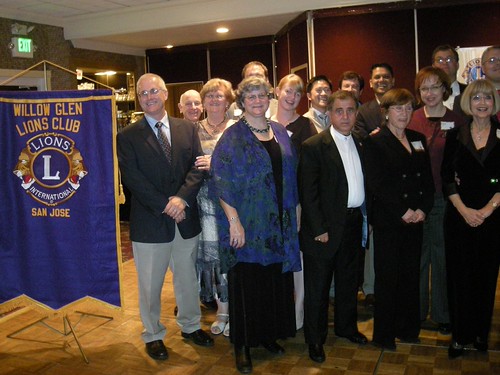
The new San Jose – Willow Glen Lions
Club
held its Charter Night event last weekend. We sold 125 tickets
and had a fun party. Sami
Asfour
lead the Charter Night event team. The
Sweet Adelines
women’s harmony chorus sang at the start of our celebration.
Our new community service club was sponsored by the
Almaden Super Lions.
Guiding Lions Karen Fillmore and Jim Issacson started and supported us.
The Willow Glen Lions club has 37 members. The youngest members are 19
and the oldest is 86.

My husband,
John Plocher, and I are
both club officers. We are enjoying meeting new folks in the

Willow Glen, California
community where we have lived for ten years.

Who Are Lions?

“Lions meet the needs of local communities and the world. Our
more than 1.3 million members in 205 countries and geographic
areas are different in many ways, but we share a core belief
– community is what we make it.”
From Lions Clubs International

Following up on this story:

Photos:

DSCN6410 DSCN6504 DSCN6454
DSCN6494 DSCN6425 DSCN6503 DSCN6483
DSCN6430 DSCN6485 DSCN6497 DSCN6426

Images Copyright 2009 by Katy Dickinson and John Plocher

1 Comment

Filed under Lions

Willow Glen Halloween

Halloween decorations
are getting more elaborate every year here
in
Willow Glen, California
. There are at least six full graveyard
scenes in front yards within a few blocks of my house. Some are put together
with purchased headstones, ghosts, zombies, spiders, bones and webs but others are
homemade and very clever. Each scene has a day and a night aspect:

DSCN5994 DSCN6075 DSCN6099
DSCN5995 DSCN6081 DSCN6091
DSCN5996 DSCN6545 DSCN6549
DSCN6117 DSCN6115 DSCN6107 DSCN6109

Images Copyright 2009 by Katy Dickinson and John Plocher

Leave a comment

Filed under News & Reviews

SEED Mentoring Autumn Event

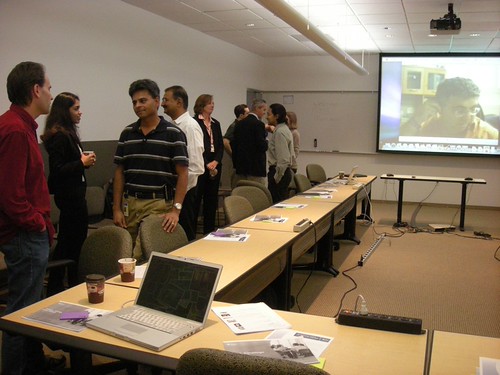
The SEED worldwide mentoring program held its regular autumn event yesterday. I think the talks and tours went very well and comments so far have been enthusiastic. We welcomed about 50 participants, with the majority joining remotely.

Speakers and activities for the event included:

Event photos:

DSCN6001 DSCN6023 DSCN6066

Images Copyright 2009 by Katy Dickinson

Leave a comment

Filed under Mentoring & Other Business

Glass Pumpkins

Glass pumpkins have become a common home decoration at this time
of year. They come in even more sizes and colors than real pumpkins.
I have a small group I bought a few years ago which live
next to my front door from September through Thanksgiving
(after which they are replaced by poinsettia plants for Christmas).

My son Paul’s High School sells
pumpkins made by David Camner and his glass students –
“The
Paly Glass Team”
– each year
to raise funds for their art program. Since my kids no longer seem
interested in carving real pumpkins to make
Jack-o’-lanterns
for Halloween, I bought three Paly art glass pumpkins to decorate
my Thanksgiving table this year. One is a long purple eggplant-like
shape, the other two are traditional shapes but unusual colors.
Paul helped me pick them out.

DSCN5948 DSCN5963
DSCN5807 DSCN5809

Images Copyright 2009 by Katy Dickinson

2 Comments

Filed under News & Reviews

Shop for a Cause

I spent last Saturday morning sitting at a table in the Valley Fair
Macy’s shoe department distributing discount tickets
in exchange for $5 donations to Santa Maria Urban Ministry
(SMUM). My husband John Plocher and I
are on the SMUM Board of Directors. We also volunteer in SMUM’s after-school homework and
computer lab program for grade school kids.

Edy Unthank
(SMUM’s grant writer, also on the Board) had arranged for SMUM to be one of Macy’s
“Shop for a Cause” program
charities. Macy’s contacted the organizations which sold the most tickets and offered us
each a table next to one of their entry doors so that we could sell even more. I put my orange
and yellow Mexican blanket on the table, set out a big bowl of candy and SMUM brochures, set
up my laptop to loop John’s
SMUM video
, and asked every shopper I could to accept a 25% discount ticket in exchange
for a $5 charity donation. In four hours, I collected 68 donations! Edy took the afternoon
shift and collected 40 more for a total of $540 (see photo below). We snooped one of the
other charity tables last Saturday and were told they had only sold $135 worth of tickets
all day – so SMUM did very well. Including the tickets we sold in advance, SMUM raised over
$1000 from this program.

Thanks, Macy’s!

DSCN5863

Image Copyright 2009 by Katy Dickinson

Leave a comment

Filed under Church